Summit K12
How SMS opt-in works
This page documents, for public verification, exactly how a Summit K12 Achieve user consents to receive text messages under Summit K12 Achieve account and document notifications. No account is needed to read it.
Where consent is collected
Only a signed-in staff user can opt in, and only from inside the Summit K12 Achieve application at achieve.summitk12.net, under Settings → Notification Preferences.
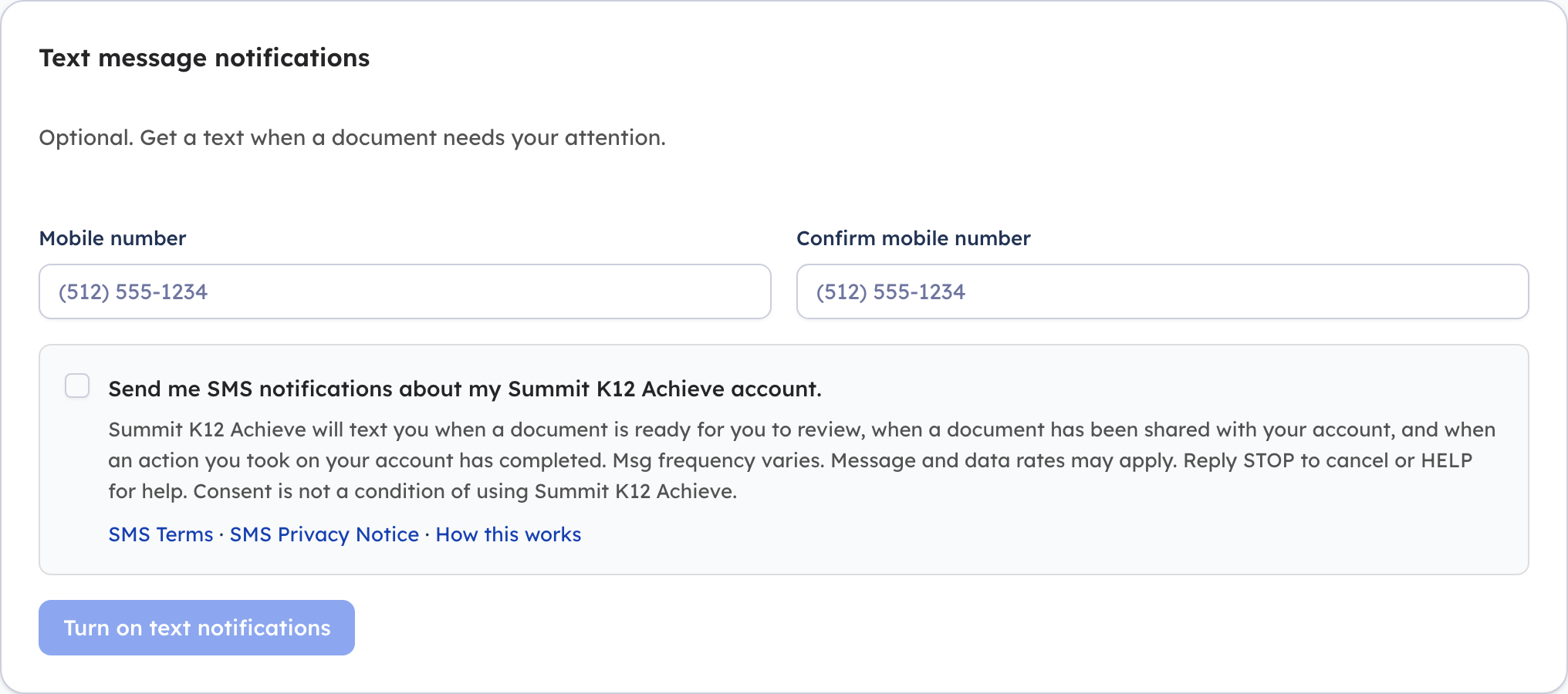
The user enters and confirms their own mobile number and ticks a consent checkbox. The checkbox is unchecked by default and is separate from acceptance of the terms of service, so consent to text messages is never bundled with anything else and is never a side-effect of signing up.
The exact language shown to the user
Reproduced from the same source the application renders, not transcribed. Consent text
version: sms-consent-v1
Shown above as it appears in the product, with the checkbox in its default unchecked state.
The live consent screen
A screenshot of the screen described above, taken from the application:
What is recorded
When a user opts in, Summit K12 stores the user’s account identifier, the mobile number, the date and time, and the version identifier of the consent text shown at that moment. Only users who have completed this step receive messages.
How consent is withdrawn
Replying STOP to any message cancels immediately, at the carrier level, for every message this program would otherwise send. A user can equally untick the box in Settings → Notification Preferences, which clears the stored number.
Domain note
Summit K12 Holdings, Inc. operates two domains. www.summitk12.com is the company’s main website and its legacy learning-management product. summitk12.net is the product domain the Summit K12 Achieve application runs on, and is where this SMS program’s documentation is published. Both belong to the same company.
Full company policies: Terms & Conditions · Privacy Policy
Summit K12 Holdings, Inc. · PO Box 26841, Austin, TX 78755 · (844) 331-4737 · info@summitk12.com